Dynamic World Map and Voyage Manifest 🏴☠️
Ahoy crew, welcome below deck!
I’ve been working on another 3D element for the game recently: the new and improved world map! The old map looked great, a beautiful hand-crafted perspective drawing, but it was by nature static and “baked-in” to that particular view, and those particular islands. So over the past month I’ve been revamping the entire system to be more dynamic.
I’m also still waiting for my baby boy to grace us with his presence. When he’s born I’ll be taking a few weeks off. When I return I hope to be able to share some more exciting news with you…
As always I must sincerely ask, why is the rum gone?
Ben
August summary
- Dynamic World Map (rebuilt from scratch!)
- Pathfinding for voyage routes
- Gamepad and mouse controls for navigation and zoom in/out
- Voyage Manifest (new and improved voyage setup screen)
Dynamic World Map
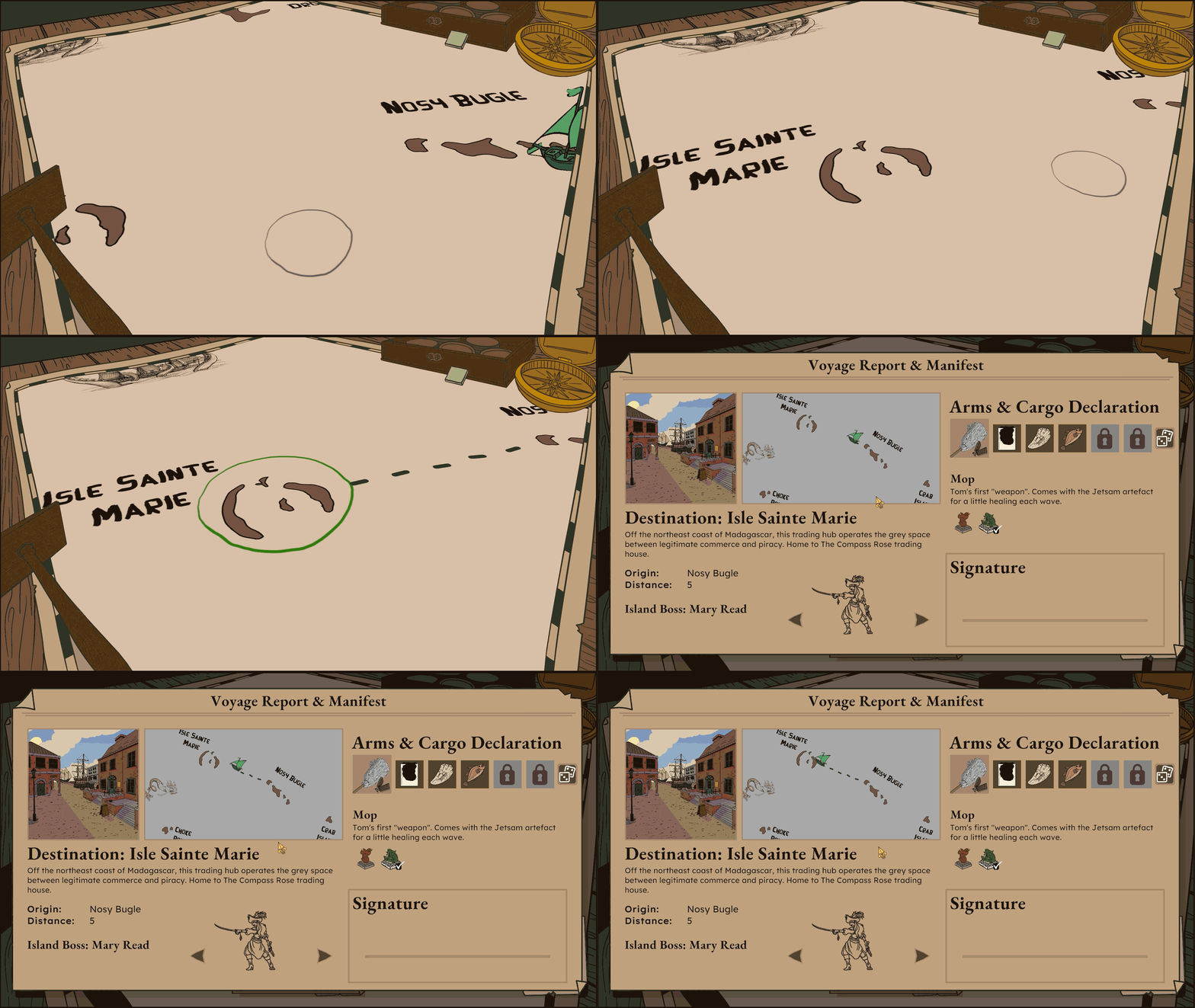
This new dynamic map allows for complete user control. You can freely scroll around the map, and zoom in and out to your liking. To achieve this while maintaining the perspective style of our original map I followed similar principles to how I got the 3D journal working (see last months Below Deck).
3D perspective with 2D art
Firstly, the world map isn’t actually 3D, it’s a flat, top-down layer of sprites and “world-space” text, sitting on a dedicated camera layer so only a particular camera can see it. Then its own dedicated orthographic camera looks straight down on that flat content, and renders what it sees to a Render Texture. When the player is scrolling and zooming, what they are actually doing is moving that camera and shrinking/growing its orthographic size. The map itself never moves.
The texture captured by the flat map camera is then sent to other parts of the game, most commonly the “3D map viewer”, which is the perspective angle the player experiences. In this case, the flat map is projected onto a 3D plane, which is viewed by a perspective camera, arranged to match the perspective of the hand-painted border.
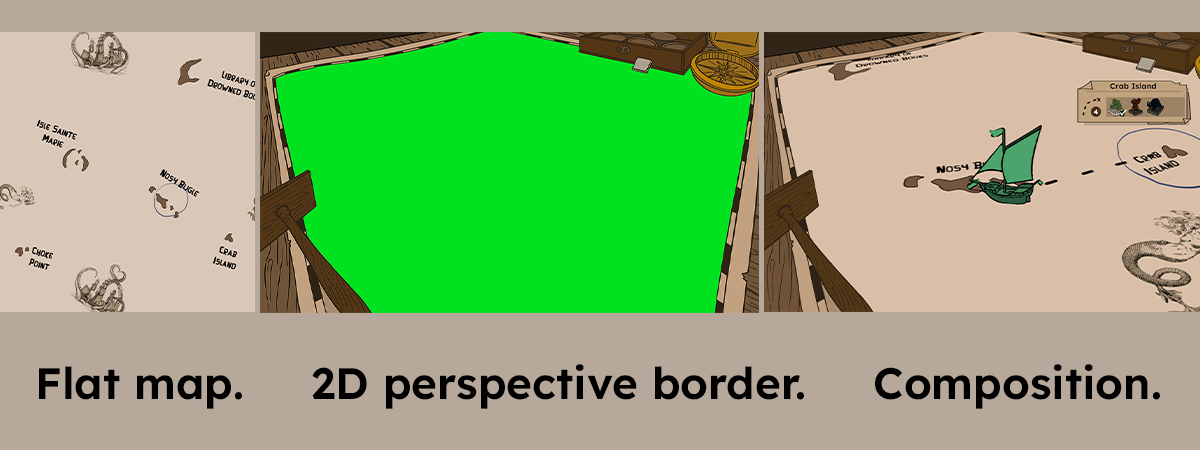
Finally that whole 3D viewer (perspective camera + plane + border art) is itself captured by yet another camera into a second Render Texture, which is drawn onto an overlay UI canvas. This final UI canvas is what the player actually sees.
Pathfinding and dashed “route lines”
The next challenge was dynamically creating voyage routes from your current location to any chosen destination. My first pass had the route find a neat, efficient path around all obstacles in the way. But this felt too smart. So I moved to a more reactive method.
Rather than pre-planning the whole route, I changed it to march in a straight line from origin towards destination in small steps, and only “notice” an island obstacle once it actually gets close to one. When that happens, it grabs that island (plus any other nearby islands so they get solved together) and finds a way around it by sampling points along the real coastline (via raycasts against the island’s actual collider shape). It finds the shortest path over these points. Once the detour clears the obstacle, the route resumes a straight line to the destination from there, reacting again if something else gets in its way.
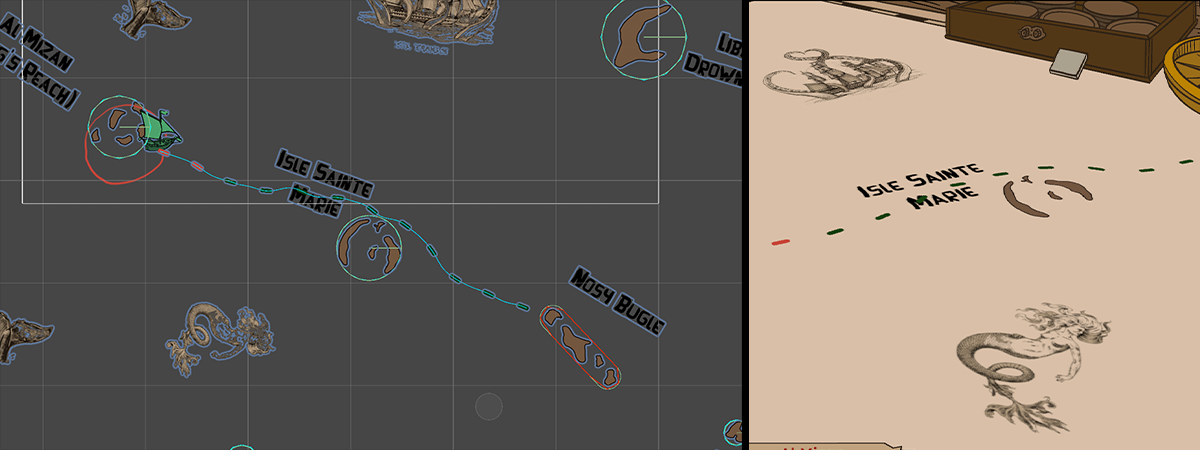
The resulting path then gets handed to a script that creates the dashed route line. That script knows nothing about the islands or path finding, it just takes the final path it was given and creates a dashed line, where each dash represents an actual voyage encounter. The amount of dashes varies based on the length of the path, meaning that the length of voyages are genuinely dictated by the distance between origin and destination.
How does the world map feed into voyage gameplay?
Right now the new map already produces the information it needs to generate the same voyages that players are used to: distance and destination (which dictates how many encounters there are and who the boss is). However, this new and improved system lays the groundwork for a much more exciting and nuanced voyage generation in the future.
My design is to add a hidden “heat-map” that divides the map into biomes; so parts of the map might be “open ocean”, others “shallows”, others “mermaid territory”. Then each dashed line (representing an encounter) can also be linked to a particular biome. The biome of an encounter would influence gameplay factors like enemy and reward pools, and visual elements such as the environment background art, meaning that your chosen routes around the wider world map can also have strategic implications. For instance, maybe there is a reward only dropped by mermaids, so you take the route through mermaid territory. Or you want to take a direct route through the open ocean, so strategically plan your cargo to best deal with the open ocean enemy pool.
Voyage Manifest
The Voyage Manifest is your new setup screen to plan your voyages. You’re shown the manifest directly from the world map when you select a destination. From the manifest you can view details about the proposed voyage, and make decisions about your weapon, cargo and even the destination boss you’d like to face.
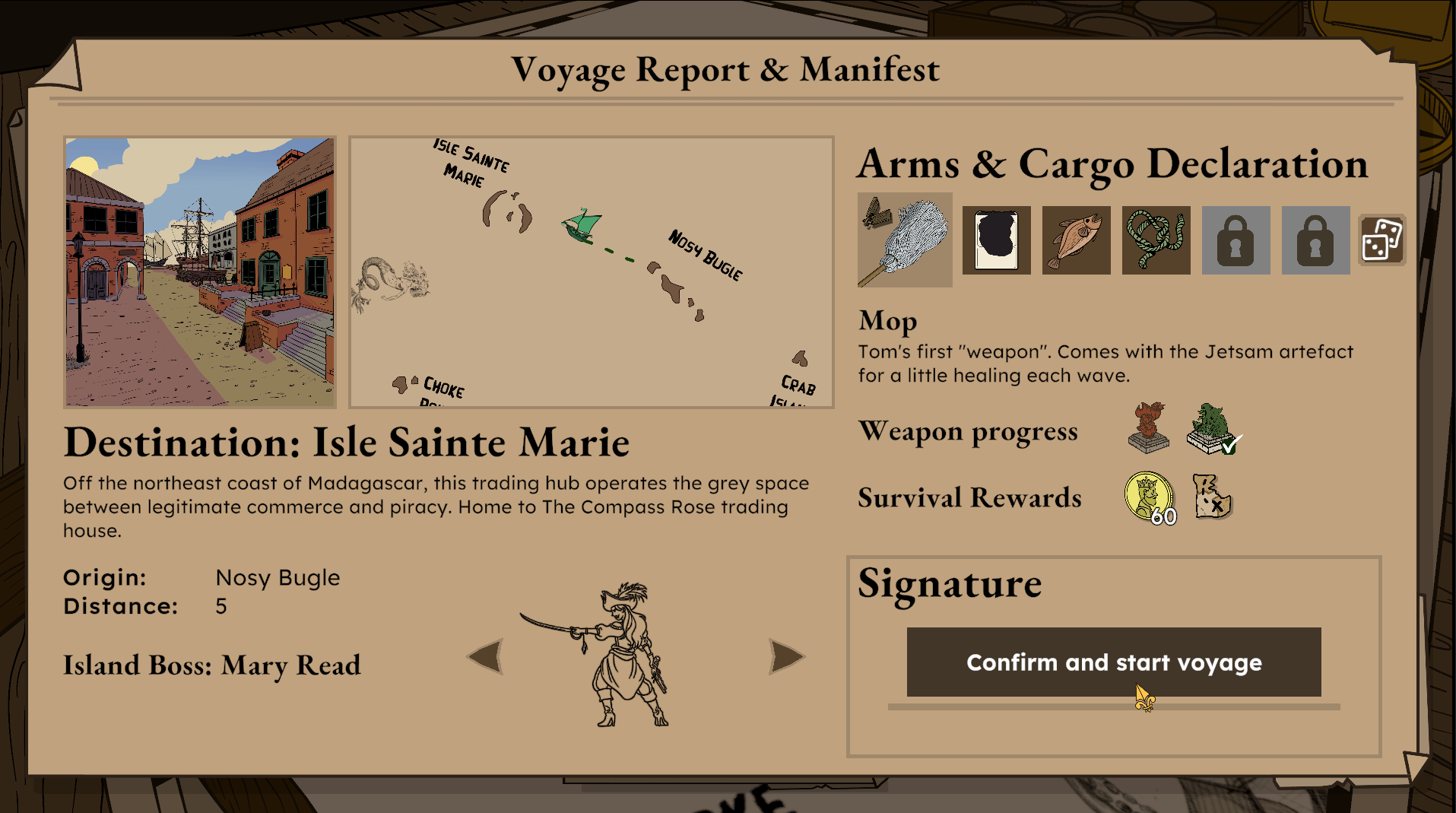
Arms & Cargo Declaration
Quickly see your current loadout, or click to make changes. There is even a button to randomize your loadout.
Weapon Progress
At a glance you can see which of the island bosses you have defeated with the selected weapon.
Survival Rewards
Based on your weapon, cargo and boss selections, you will be shown the resulting rewards of a successful run. Special resources will be granted for the first time you beat each boss with a new weapon, encouraging players to try a variety of loadouts. There are special rewards for the first time you beat each boss using a randomized loadout too.
Signature
Click to confirm your cargo declaration and start the voyage!
What next?
- Baby #3
- Link new map and manifest back up into the game loop
- Playtest the new stuff! (TBC)
Until next time me hearties, yo ho!
Ben and the Cass Bay Games Team